Aaron Ardiri's Lemmings is one of the best games for Palm OS, especially for those of us who are a little nostalgic. A few years ago Aaron put the full source code on GitHub (ardiri/palmos-lemmings). The game already supports high density screens: on a Palm OS 5 device it runs at 320x320. But on my Tungsten T3 the bottom third of the screen stays reserved for the Graffiti area, even with the slider open, and in landscape a whole column is wasted.
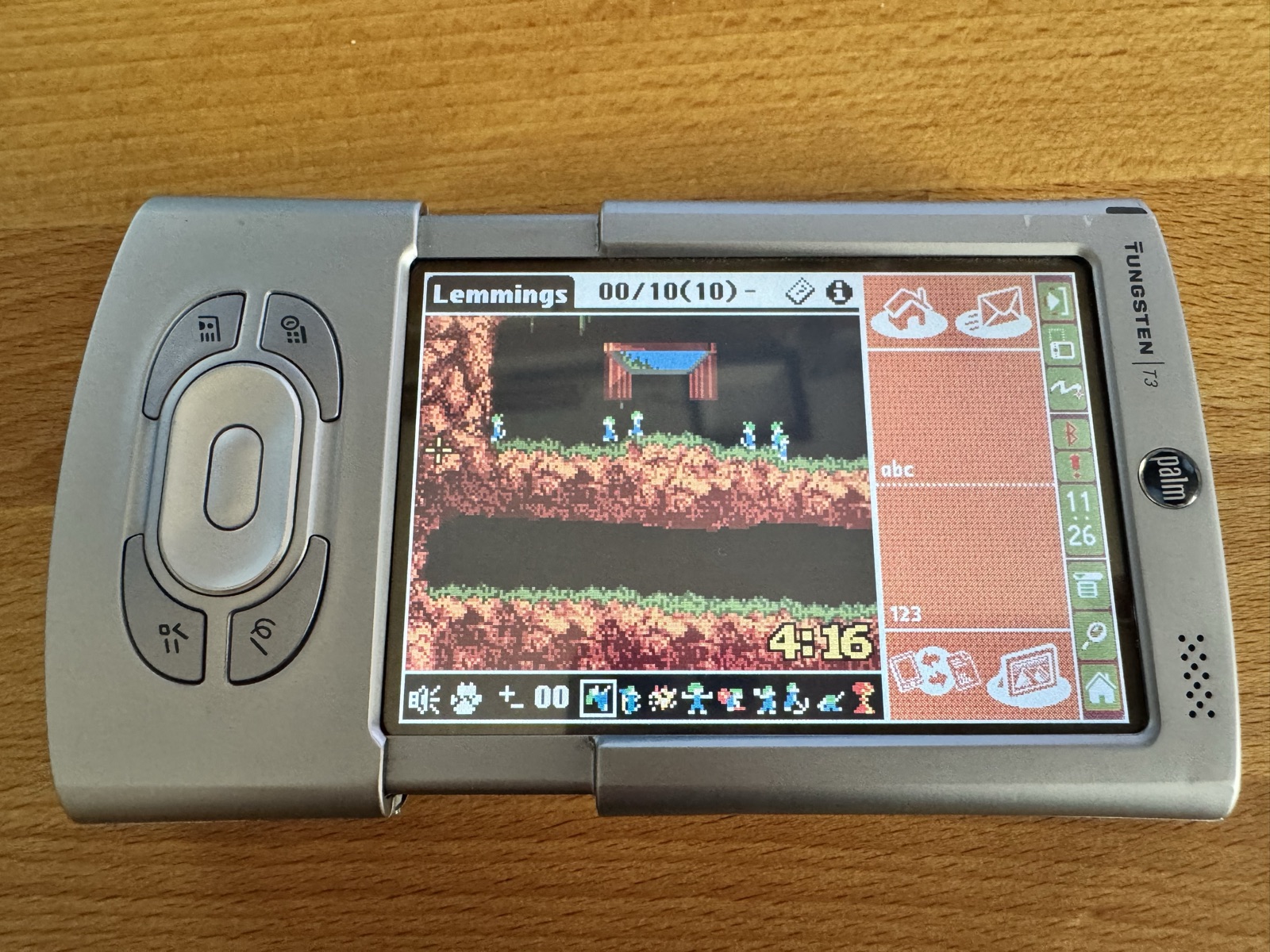
The T3, T5, TX and LifeDrive have a 320x480 screen with an input area that can be collapsed. palmOne called this HiRes+. Lemmings does not know about it. This article shows how I added it.
Building the original first
Before changing anything, the original source has to build. I use the macOS toolchain from Building Palm OS Applications on macOS (Apple Silicon). It needed only small changes. gcc 2.95 stumbled over a carriage return at the end of 39 macro lines in four headers, so those carriage returns had to go (everything else keeps its line endings), and the Makefile got an optional switch for this toolchain, with a small replacement for an old helper tool. Aaron's own build stays as it was. On a Mac it is make PALMDEV=~/tools/palmdev-macos. The result is almost byte for byte identical to the PRC in Aaron's repository. That is a good starting point: every difference after that comes from my changes.
The Pen Input Manager
A HiRes+ device tells an application about its input area through the Pen Input Manager (PINS). An application has to ask for it. Without that, Palm OS keeps the input area open and gives the form 320x320 pixels, which is exactly what Lemmings gets today.
The game is built against the Palm OS 4.0 SDK, which has no PINS. Like the existing header for the high density API, the declarations from the Palm OS 5 SDK R3 go into a small header of their own, PalmPINS.h, with the trap selectors for the few calls the game needs.
At start-up the game checks for the feature:
globals.prefs->palmHD.pins =
  (FtrGet(pinCreator, pinFtrAPIVersion, &pinsVersion) == errNone) &&
  (pinsVersion >= pinAPIVersion1_0);
Without PINS, nothing changes. The game behaves as before on every other device.
Making the game form resizable
When the game form is loaded, it tells Palm OS that it handles the input area itself and that it can be any size:
FrmSetDIAPolicyAttr(frm, frmDIAPolicyCustom);
WinSetConstraintsSize(FrmGetWindowHandle(frm),
                      160, pinMaxConstraintSize, pinMaxConstraintSize,
                      160, pinMaxConstraintSize, pinMaxConstraintSize);
From then on, the game gets a winDisplayChangedEvent whenever the player opens or closes the input area or turns the screen. The form then takes the new display size, the title buttons move to the right edge and the tool bar is centered.
The game itself needed more work. It was written for a view that is always 160 pixels wide. Now the width depends on the display:
- Landscape: 240 instead of 160 level pixels, and 480 in the game's own widescreen mode.
- Portrait: the view stays 160 pixels wide, and the input area stays where it is. The extra height would only add an empty strip below the tool bar.
- When the size changes, the view stays centered on the same part of the level.
Two bugs on the way
The wrong density. The game worked out the screen density from the screen width. A 320 pixel wide screen meant double density. On a HiRes+ device in landscape the screen is 480 pixels wide, so the game decided it was a low density screen. The fix is to ask Palm OS directly with WinScreenGetAttribute(winScreenDensity, ...).
An endless repaint. The game remembers whether the player wants the input area open or closed, and restores that after every dialog. But the PINS setters post a new winDisplayChangedEvent even when the state does not change. Each repaint set the state again, which caused another repaint, and the game stopped running. Now the game only sets a state that is actually different:
if (PINGetInputAreaState() != state)
  PINSetInputAreaState(state);
The Tungsten T3 is special
In the emulator everything worked. On my T3 the game stayed at 320x320. The reason: a stock T3 has no PINS at all. It uses palmOne's own "Active Input Area" instead. PINS comes with palmOne's Tungsten T3 DIA Compatibility Update, which you have to install. After that and a soft reset, the T3 reports PINS 1.1, the same version as the later devices, and the game finds it.
And with the input area collapsed, the level finally fills the screen:
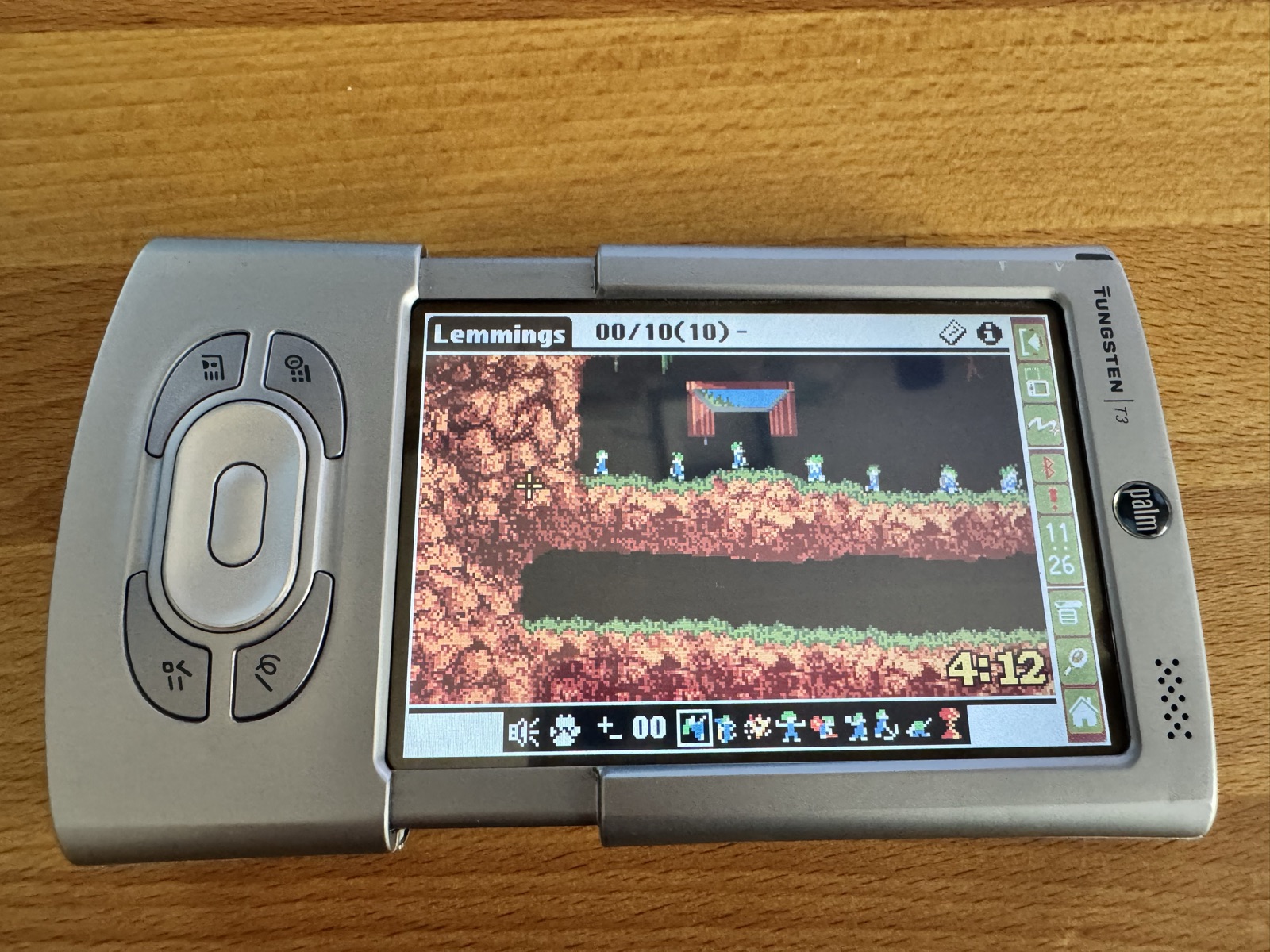
When you turn the screen with the rotate button in the status bar, the game adjusts to the new size.
The 5-way navigator
With a wider view the navigator became more useful. On devices with a 5-way navigator, left and right now scroll the view over the level, faster while held. Up and down choose the tool. You still place the cursor with the stylus, and the center button still assigns the tool. Devices without a navigator keep their configured keys.
(Video: left and right scroll the view over the level, up and down pick the tool.)
Black bars and no status bar
When I sent Aaron the first photos, he had one wish right away: the space beside the tool bar should be black, not white. On the wider screen the tool bar is centered, and the form background showed on both sides. Now the game fills that space black.
That made the title bar the odd one out, so on HiRes+ devices it is black now too, with the title, the lemming figures and the two icons in white. The icons were the tricky part. My first version drew them with WinDrawBitmap in inverted mode, but they still showed up as black icons in white boxes. WinDrawBitmap always draws in normal mode. WinPaintBitmap is the call that respects the current drawing mode:
WinPushDrawState();
WinSetDrawMode(winPaintInverse);
WinPaintBitmap(bitmap, x, y);
WinPopDrawState();
The last step was the status bar on the right, with its clock and buttons. PINS can hide it with StatHide. In landscape the game now hides it while the input area is collapsed, and the level gets the full 240 pixels. But the status bar also holds the button that opens the input area. So the game menu has a new item, Input Area, which brings back the input area and the status bar together. You open the menu by tapping the title. When you leave the game, the status bar comes back.
In portrait, the game keeps the input area and the status bar. When you turn the T3 to portrait, the input area opens. My first version also locked the collapse button there, with PINSetInputTriggerState. On the T3 that locked the rotate button as well, because both depend on the same trigger, and the game could no longer be turned back to landscape. Now the trigger always stays enabled.
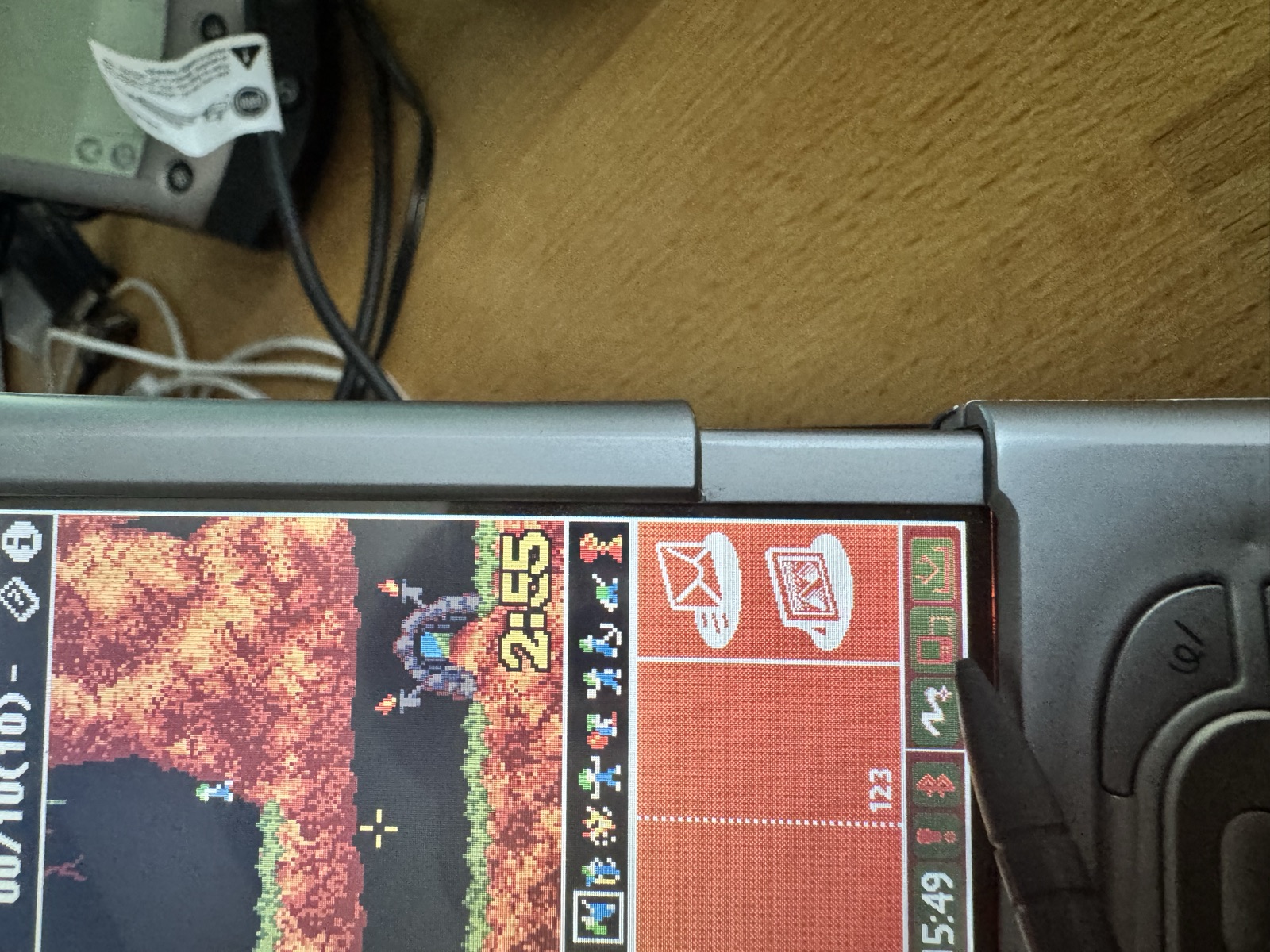
One thing I left as it is: in portrait, the input area and the status bar show up in the level's colors, reddish brown instead of the usual blue. The game switches the screen to 16 colors, and every level loads its own palette. Palm OS draws the input area with the same 16 colors. On the old 160x160 devices the Graffiti area was printed on the glass, so nobody ever noticed. Fixing it would mean changing the game's drawing code, and in landscape you don't see either of them anyway.
Fast forward
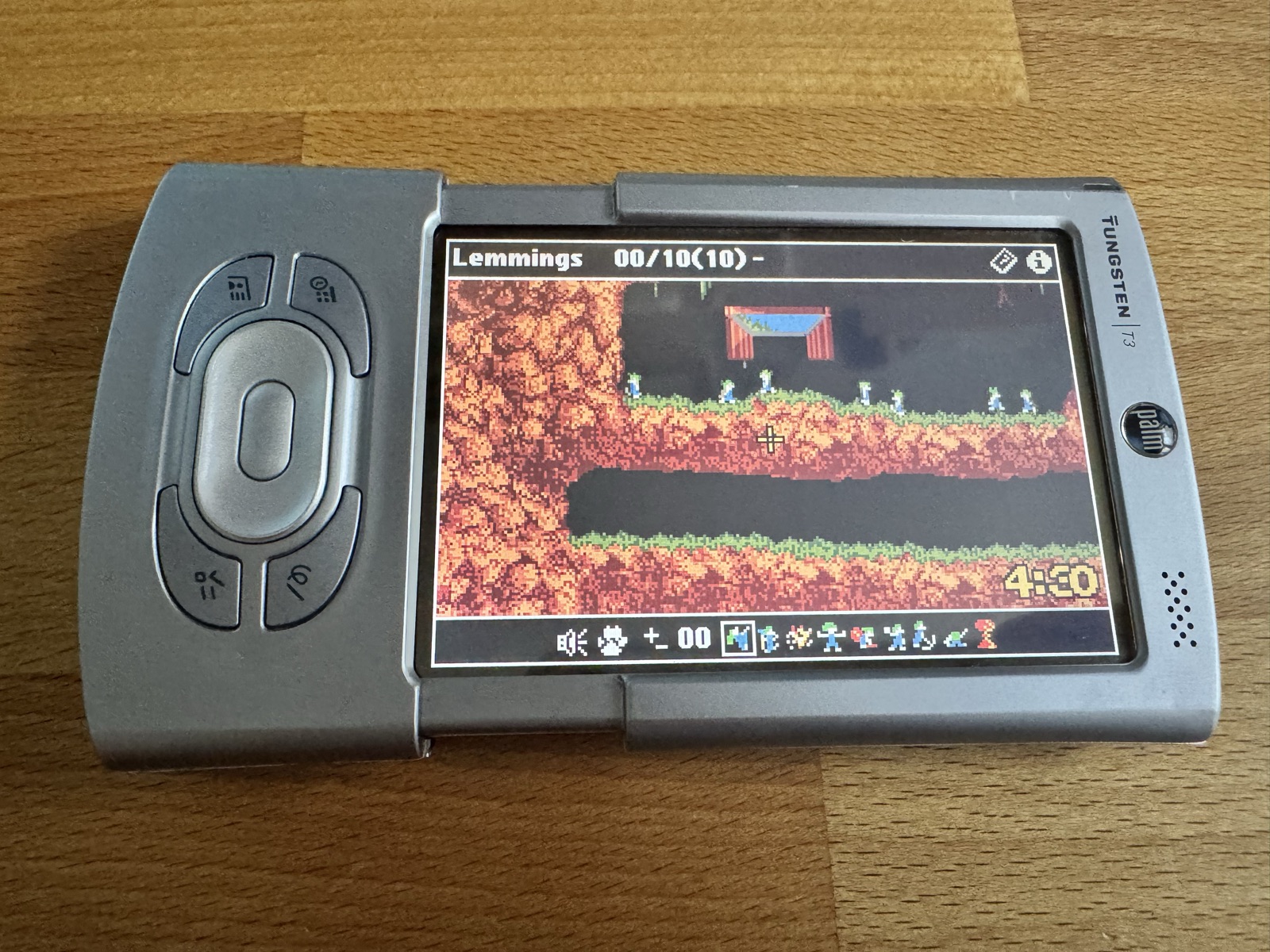
Once all the lemmings are on their way, there is often nothing left to do but wait. Later Lemmings versions had a fast forward for that, and so had Caveman, Aaron's own later version of the game. Now the Palm version has one too: the level runs four times as fast.
The game does not draw faster for that. It runs four steps of the game logic per frame and draws only the result, so even a slow device keeps up, and the clock runs fast too. Fast forward runs while you hold the Memo key, on every device; on the LifeDrive that is the Files key in the same place. Selecting a lemming stays with the stylus and the center of the navigator. In landscape on HiRes+ devices, a small button left of the tool bar switches it on and off, framed like the selected tool while it is on. Every level starts at normal speed.
(Video: with fast forward, the lemmings and the clock run four times as fast, until the verdict.)
On the m515 the first version had a funny side effect: the music ran four times as fast too. Devices before Palm OS 5 have no sound streams, so Aaron's simple music engine plays the tune itself, one step per step of the game logic. With four steps per frame, that was four times the tempo:
(Video: fast forward on the m515, with the music racing along.)
The fix was to move the music out of the game logic. GameMovement, which moves the lemmings one step, used to call GameMusicPlayback as well. Now the event loop calls it, once per frame, after all the steps of the game logic, and not while the game is paused:
GameMovement(globals.prefs);
if (fast)
  for (step = 1; step < FAST_FORWARD; step++)
    GameMovement(globals.prefs);

if (!globals.prefs->game.gamePaused)
  GameMusicPlayback(globals.prefs);
So the music keeps its pace, however many steps the game logic takes. On the T3 it never mattered, because the MIDI stream of Palm OS 5 has its own clock:
(Video: fast forward on the m515, the music keeps its pace.)
One thing still ran at normal speed: the 5..4..3..2..1 above the lemmings after a nuke. It was counted down in GameDraw, once per frame. The countdown and the change into an exploder now run in GameMovement, once per step of the game logic, so with fast forward the lemmings blow up four times as fast too.
Music for every level
The level packs bring their own music, a different tune per level. On the m515 this always worked: the simple music engine plays the tunes of the pack. On Palm OS 5, Aaron's MIDI engine in ARM code played the Can Can of the PRC in every level, because the MIDI from the level packs was switched off. Switching it on gave "Let's go!" and then silence.
The MIDI files in the packs have several tracks and leave out repeated status bytes (running status). The engine plays only the first track and expects a status byte on every event. So the game now converts the tune when a level starts: GameMidiNormalize merges the tracks by time into one track with a status byte on every event, keeping the notes, controllers, instruments and tempo changes. The result goes into the cache database the engine already plays from.
The levels built into the PRC had only the Can Can, on every device. They now have the three tunes of the Classic Fun pack, which change from level to level, on the m515 as well as on the T3.
(Video: the tune of the level on the m515, played by Aaron's simple music engine.)
(Video: the MIDI tune of the level on the T3, then fast forward and a nuke, with the countdown running fast as well.)
Bugs only the real device showed
A few evenings of playing on the T3 brought up more problems than any emulator.
The game quit by itself
After a minute or two the T3 switched itself off, and the game was gone. Lemmings never resets the auto-off timer, and a level is often played without touching anything: you just watch the lemmings walk. When the device goes to sleep, the game pauses, saves and quits, as Aaron designed it. Nothing is lost, but it feels like a crash. Now, while a level runs, the game calls EvtResetAutoOffTimer every frame. When the game is paused, the device may still switch itself off.
Every form has its own input area
On Palm OS 5 the state of the input area and the status bar is stored per form, and a new form starts with both open. That caused two bugs. The alert that asks whether you really want to quit is built by Palm OS itself, so it always brings the status bar back. The alert had already laid itself out for the full width, and the status bar cut it off:
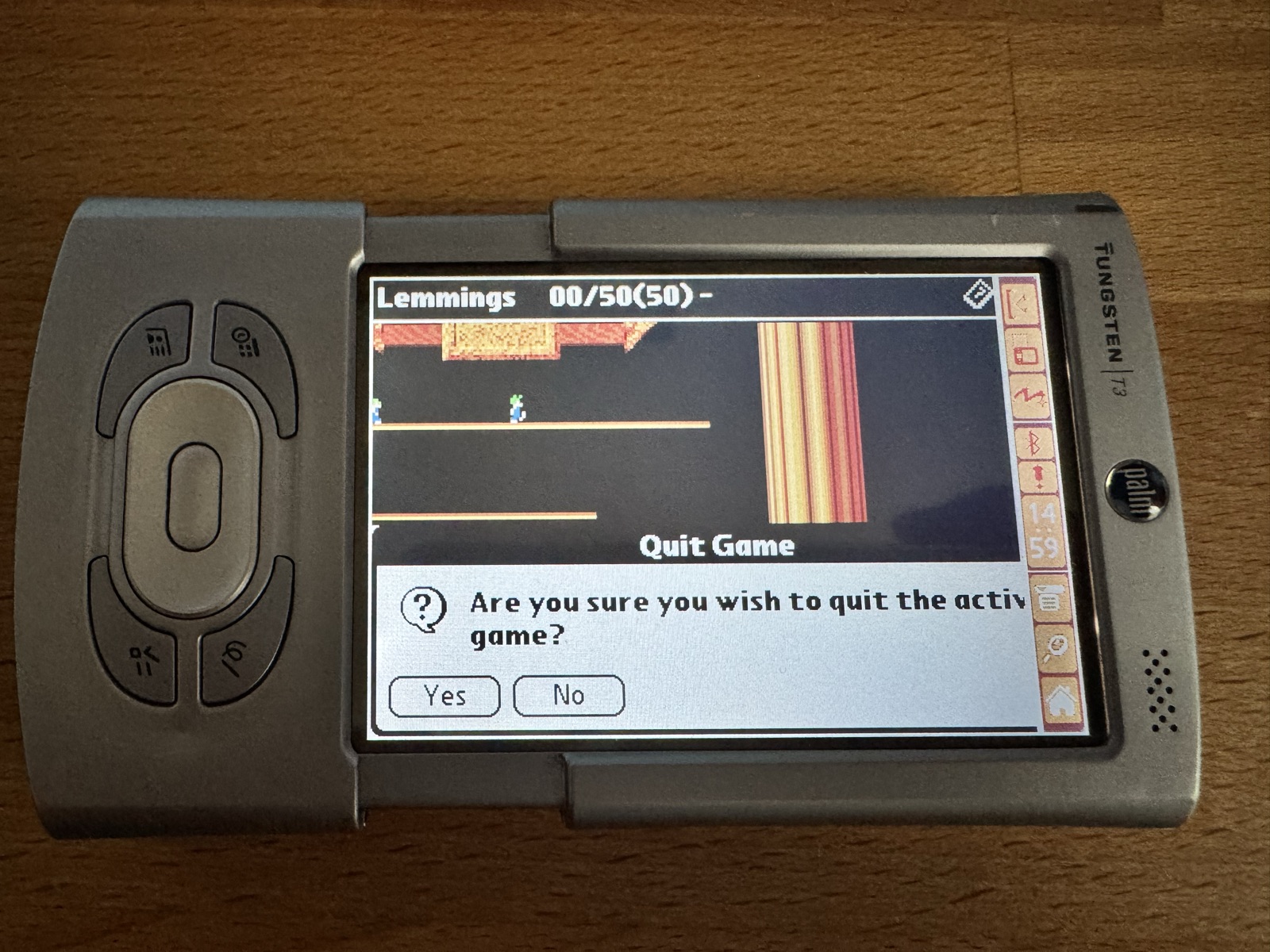
The fix is to show the status bar before the alert appears, so the alert fits into the space that is left, and to hide it again afterwards. The same goes for the alert that tells you there is no tool of that kind left.
The dialogs between two levels, the verdict and the next mission, are forms of the game. One version hid the input area there too, and the mission dialog ended up next to an empty white area:
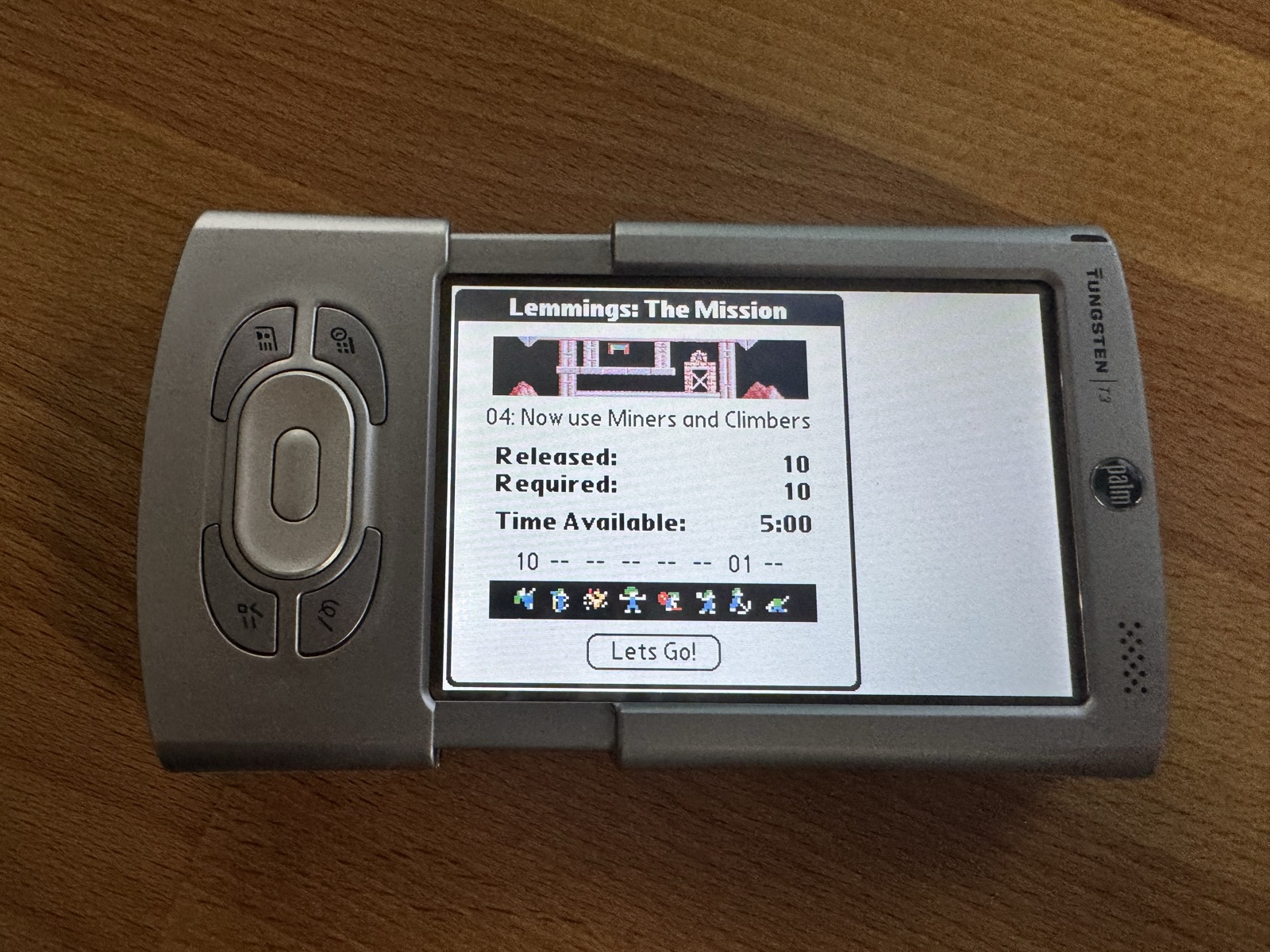
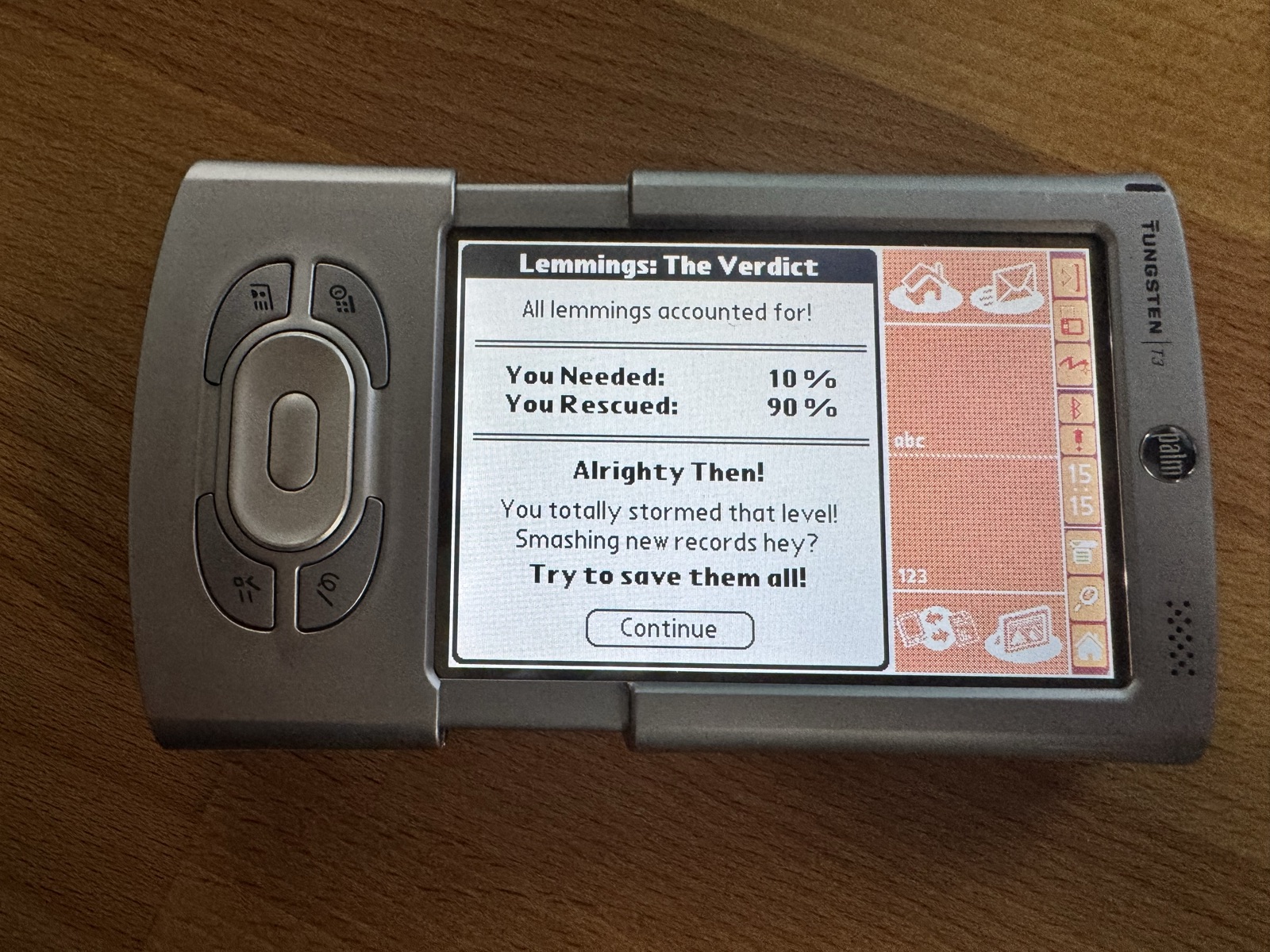
Now the dialogs show the input area and the status bar. As soon as the game is back, it restores the full screen before it handles anything else:
Where is landscape?
The hardest bug: after a level, the next one sometimes started with the input area open. To find out what happened on the device, I had the game record what happened, every dialog, every resize and every display change, together with the state of the input area. To read that record without a debugger, the game showed it in an existing alert. That is why it asks whether I want to remove a level pack (I answered No):
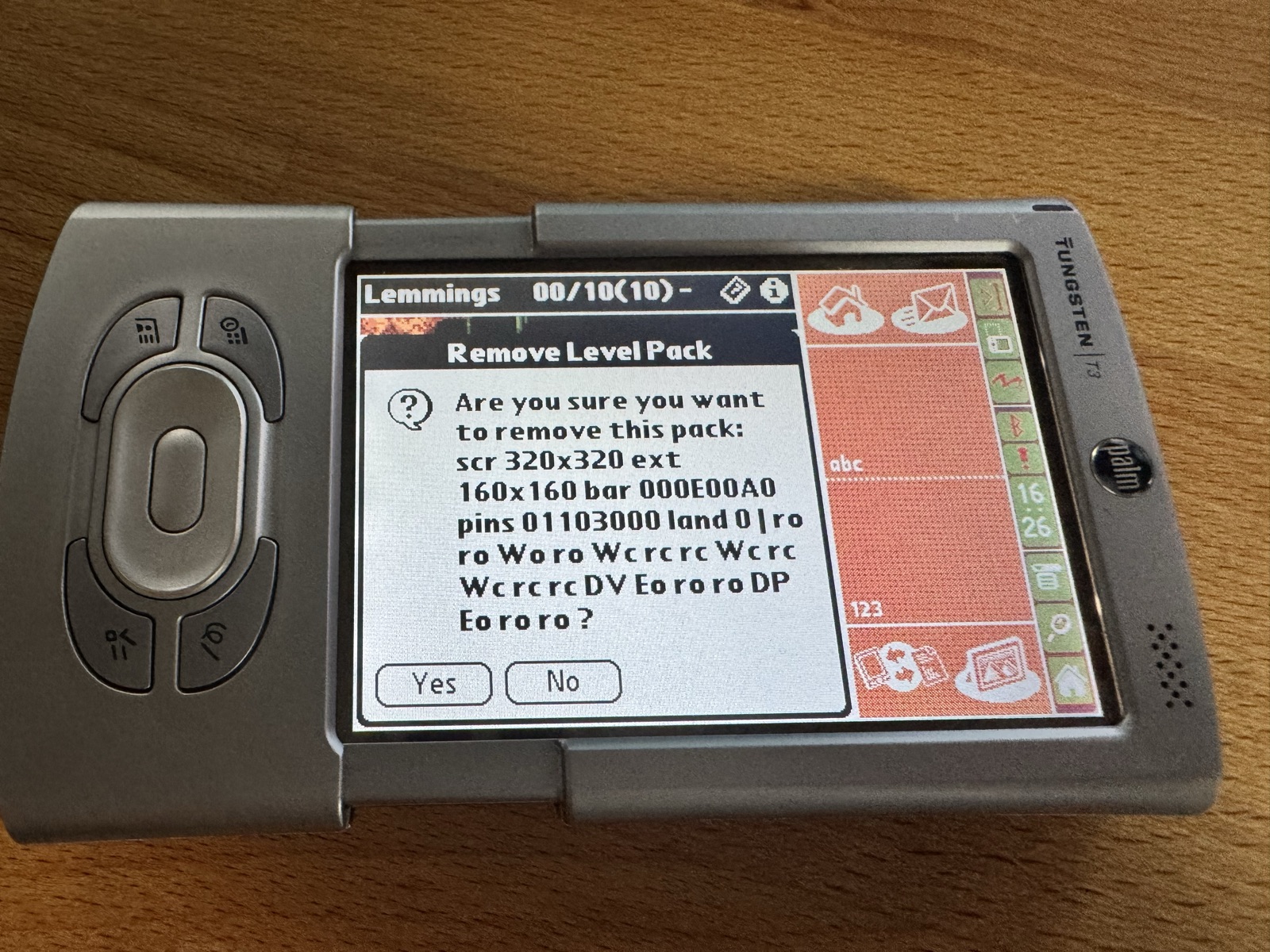
The answer was in the first line. The game decided between portrait and landscape by the screen size. But the T3 reports 320x320 when its slider is closed or its input area is open, in either orientation. So the game took landscape for portrait, and in portrait it keeps the input area. SysGetOrientation did not report landscape in every state either.
The status bar does tell: it runs along the long side of the screen and turns with it, 14x160 in landscape and 160x14 in portrait, and Palm OS reports its size even while it is hidden:
StatGetAttribute(statAttrDimension, &dimension);
landscape = (dimension >> 16) < (dimension & 0xFFFF);
Since then, every level starts in full screen again.
Holding a key launched another application
With fast forward on the To Do key, a new bug appeared: if you still held the key when a level ended, the To Do application opened. The game form keeps the application keys to itself, but the dialogs between the levels have their own event loop, and that loop handed every event to the system first. The fix is a filter at the top of that loop: while the game is underneath, the key events of the four application keys never reach the system.
if (gameActive && (event.eType == keyDownEvent) &&
    (event.data.keyDown.modifiers & commandKeyMask) &&
    (event.data.keyDown.chr >= vchrHard1) &&
    (event.data.keyDown.chr <= vchrHard4))
  continue;
Palm OS has a ready-made check, TxtCharIsHardKey, but it also matches the power button, and that one has to keep working.
A locked rotate button after the game
This one was mine. When it starts, the game switches on the rotate button of the status bar. On exit it switched it off again, instead of restoring what it had found. That locked the device in whatever orientation the game ended in, for every other application. It only showed up once the game knew that the T3 has PINS 1.1, because only then did this code run at all. The fix: at start the game remembers the setting it finds, and on exit it puts back exactly that one.
// start
globals.pins.orientationTrigger = SysGetOrientationTriggerState();
SysSetOrientationTriggerState(sysOrientationTriggerEnabled);

// exit
SysSetOrientationTriggerState(globals.pins.orientationTrigger);
The freeze the original had too
The worst bug took the longest. A level ends, the verdict dialog is on screen, and the T3 switches itself off. You put it in the cradle and press the HotSync button. The T3 wakes up, shows a white screen with the status bar, and freezes. Only a reset helps.
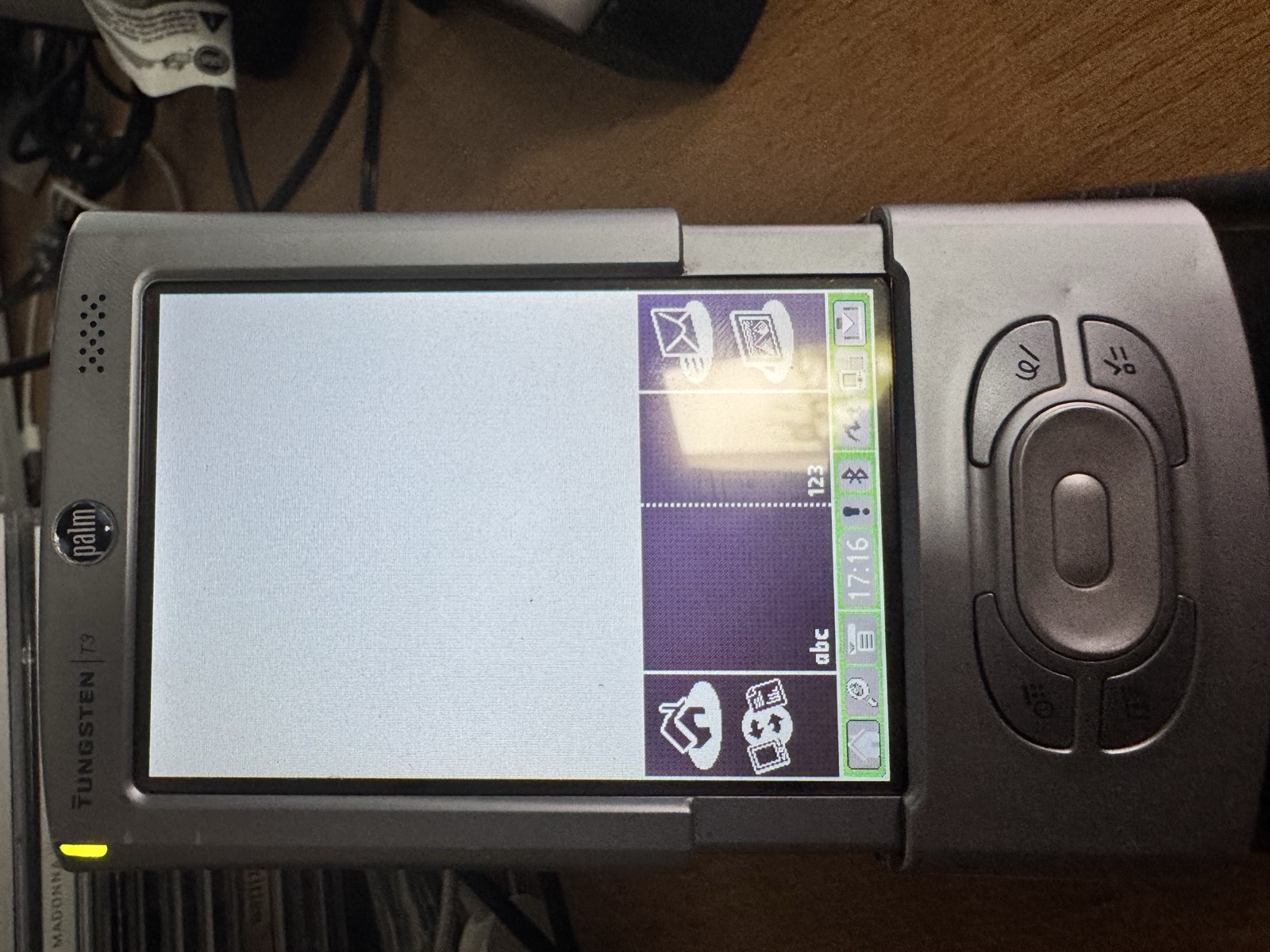
A frozen device cannot show any debug output. So the game wrote breadcrumbs instead: at every step of its shutdown it stored a number in an unsaved preference, which survives a soft reset. On the next start, it showed the last number in our well-known alert. The first run stopped after step 5: the game had saved its preferences and then hung while shutting down its sound and graphics.
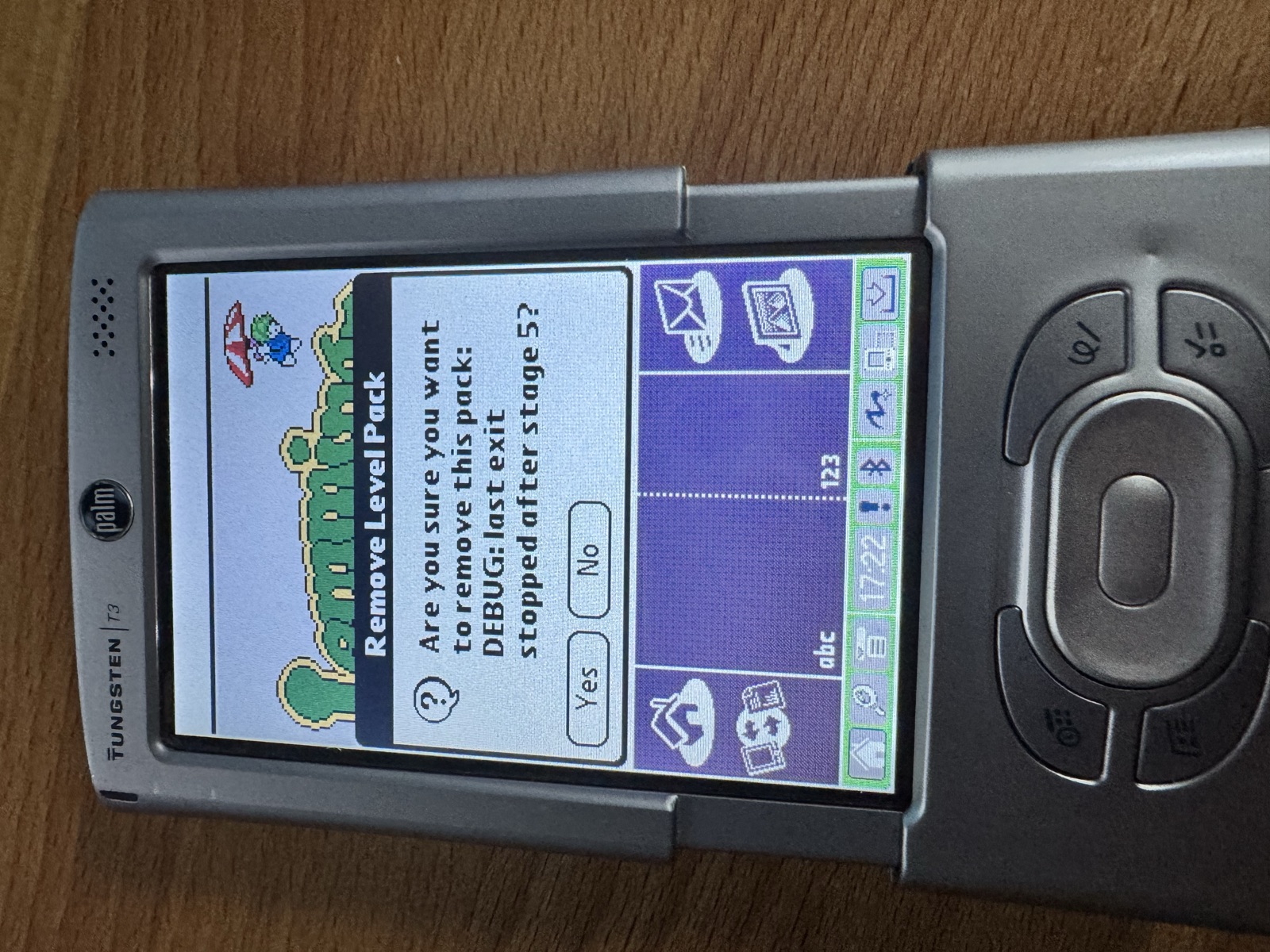
More breadcrumbs narrowed it down to step 25: the sound effects stream had been stopped, and SndStreamDelete never returned.
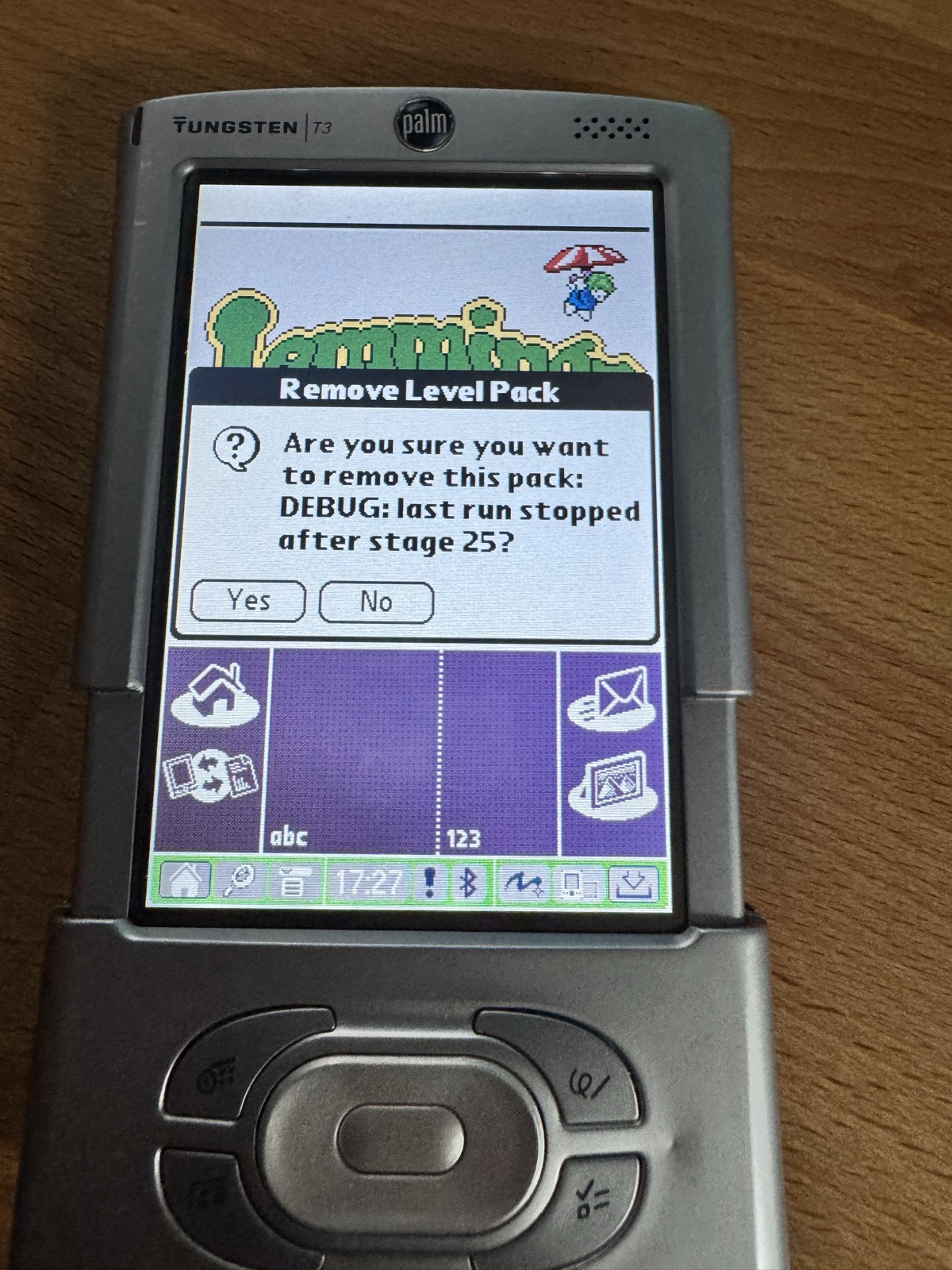
The sound effects run as a stream that the game starts once and that plays silence when there is nothing to play. Lemmings already ends itself when the device goes to sleep during a level, but it deleted the stream only on the way out, after the wakeup. Stopping the stream before the sleep did not help, neither did a fix in the sound callbacks (they had a loop that would have run four billion times for an empty buffer, but that was not it). And then the test that changed the picture: Aaron's original build from 2002 freezes in exactly the same way. It was never a HiRes+ bug.
The fix: since the game ends with the sleep anyway, it now shuts down music and sound effects in the sleep notification, while the device is still awake. After the wakeup there is nothing left to delete, and the HotSync starts as it should.
What you need
- A Palm OS 5 device with a 320x480 screen: Tungsten T3, T5, TX or LifeDrive.
- On the T3: palmOne's Tungsten T3 DIA Compatibility Update.
- The new lemmings_en.prc and at least one level pack (
.pdb), both from Aaron's repository on GitHub.
Turn the screen to landscape and collapse the input area, and the level fills the screen. The game remembers your choice. To get the input area back, tap the title and choose Input Area in the menu.
Availability
The source headers say that changes may only be redistributed with Aaron's consent. So I asked him first. He kindly agreed and merged the changes into his own repository, so HiRes+ is now part of the official source, together with an updated PRC: https://github.com/ardiri/palmos-lemmings
Sony's Clié NR70 and NX70 (Palm OS 4 and 5) have a collapsible input area too, with Sony's own API instead of the Pen Input Manager. HiRes+ on these devices may follow one day.
The story behind the game
While working on this, Aaron told me a lot about how Lemmings came about in 2001: bitmaps in write-protected memory, a MIDI engine in ARM code, booby traps for pirates, and why HiRes+ never made it back then. That became its own article: "f*ck you palm :P" – The story behind Lemmings for Palm OS.
Still at home on a Palm Vx
HiRes+ is for the late Palms, but Lemmings has not forgotten where it came from. To close, here it is on a Palm Vx from 1999: four shades of gray, 160x160 pixels, and still great fun.
Thanks and links
- Aaron Ardiri and Chip Kerchner for Lemmings, and Aaron for publishing the source and agreeing to these changes: https://github.com/ardiri/palmos-lemmings
- Building Palm OS Applications on macOS (Apple Silicon)